Dec 3, 2025
Sagar
Gaur
What Is a “Culture of Automation”?
“Culture of automation” refers to an organizational mindset where teams consistently look to automate processes as a default behavior. It means automation isn’t just a one-time project or tool, but a core value ingrained in how work gets done. In practice, this culture is evident when employees encountering any time-consuming or monotonous task immediately ask, “Can we automate some or all of this?”. High-performing DevOps organizations, for example, have long embraced this principle, along with Culture, Automation, Measurement, and Sharing (CAMS), as pillars of their success. Today, enterprises are extending this philosophy beyond DevOps into cybersecurity (SecOps), IT operations, and engineering teams, recognizing that manual efforts cannot keep pace with modern demands.
Why Automation Culture Matters for Security and IT Teams?
Operations Center (SOC) teams face surging attack volumes, alert floods, and an acute shortage of cyber talent. (Notably, there’s a projected shortage of 3.5 million cybersecurity workers by 2025) As CrowdStrike observes, “Automation is critical” for SOCs to handle the scale and sophistication of threats, enabling faster responses and relieving overburdened analysts. Similarly, SentinelOne frames the future as an “autonomous SOC” where machines increasingly augment human teams by taking over tedious work, allowing analysts to focus on high-value strategy and complex decision-making. In IT operations and DevOps, the story is analogous: rapid software delivery, cloud complexity, and uptime expectations demand automation to achieve reliability and speed.
Current trends reinforce why building an automation culture is now more critical than ever. Enterprise automation is accelerating; for example, Gartner projects that by 2026, 30% of enterprises will automate over half of all network activities (up from under 10% in 2023). Additionally, hyperautomation (the coordinated use of multiple automation and AI tools at scale) has become mainstream in 90% of large enterprises. The rise of AI and no-code platforms is also lowering barriers, enabling a broader base of users to create automations. However, these advances come with constraints and challenges: organizations must manage governance, avoid “shadow IT” automation, and overcome employee fears about job security. In short, technology has evolved to make automation more powerful and accessible, but culture, i.e., people’s mindsets, skills, and trust, is the deciding factor in realizing its full value.
What Pain Points Does Automation Culture Solve?
Adopting a culture of automation directly tackles several operational and organizational pain points that plague modern IT and security teams:
Volume Overload and Alert Fatigue: Security teams often must sift through hundreds of alerts daily. An automation-centric SOC offloads this grunt work, automatically triaging routine threats so that analysts can focus on real incidents. This cuts through “noise” and speeds up threat response. Overwhelmed teams gain relief as repetitive monitoring is handled by scripts or bots, reducing burnout.
Inefficiency and Slow Response: Manual processes in IT and security are not only slow but also error-prone. Automations execute tasks in seconds with consistent accuracy. In fact, McKinsey estimates automation can save up to 20% of an employee’s time spent on repetitive tasks, and IBM found automation can reduce error rates by as much as 95%. This translates to faster incident containment in SecOps and quicker service delivery in IT Ops, with fewer mistakes.
Talent Scarcity and High Workload on Experts: With skilled professionals in short supply, it’s wasteful to have highly trained engineers or analysts perform mind-numbing routine tasks. Yet surveys show a considerable portion of their day is spent exactly on that. One report noted that security analysts spend at least 30% of their workday on routine tasks such as sorting alerts and gathering data. This contributes to job dissatisfaction and attrition. A strong automation culture frees experts from “toil” so they can focus on challenging problems, effectively multiplying team capacity. It also improves morale; two-thirds of SecOps analysts believe half their tasks could be automated today, and they’d welcome that change.
Inconsistent Processes and Human Error: In many organizations, procedures differ from person to person, leading to conflicting outcomes. Automation enforces best-practice workflows uniformly every time. For example, standardized automated playbooks in incident response ensure no critical step is missed (e.g., blocking an IOC, notifying stakeholders), whereas a fatigued human might slip up. This consistency improves compliance and audit readiness. As one study put it, “data points without context are just numbers.” Manually piecing together incident data leads to guesswork and missing context, while automated tools can instantly correlate and enrich data to provide a clearer picture.
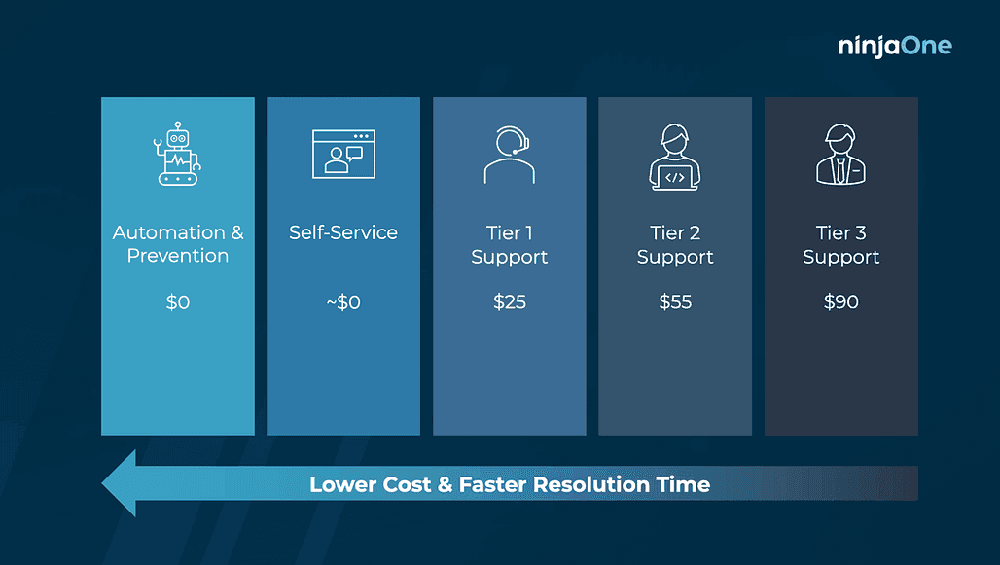
Operational Cost and Scalability Issues: Relying on manual effort doesn’t scale. Hiring more people for every new workload is expensive and often infeasible. An automation-first approach, by contrast, scales processes through technology. It’s telling that self-service or automated resolutions cost near $0, compared to escalating an issue to Tier-2 or Tier-3 human support, which can cost dozens of dollars per ticket (as the graphic above shows). Automation reduces the cost per action, enabling teams to handle growing workloads within budget.
Cross-Team Silos and Handoffs: When work passes between teams (Dev to Ops, Detection to Response, etc.), delays and miscommunication often occur. Automation can integrate these handoffs, for instance, automatically creating an IT ticket and Slack notification when SecOps triggers an incident, so everyone gets the memo in real time. A culture of automation encourages teams to connect their tools and share data freely. This reduces friction between departments and speeds up end-to-end workflows.
Importantly, these benefits aren’t just theoretical. Evidence from the field underscores them. Nearly 25% of organizations report being bogged down by menial tasks, and over 50% of analysts say time spent on tedious work is what they dislike most about their jobs. No wonder high-performing teams make automation a habit – it directly relieves these pain points and lets people do more fulfilling, higher-impact work.
Best Practices to Build an Automation-First Team. What High-Performing Teams Do Differently
Fostering an automation-first culture requires deliberate steps across people, process, and technology. Below are concrete best practices and strategies for teams and enterprises to embed automation into their DNA:
Secure Leadership Buy-In and Vision: High-performing teams secure executive champions who articulate a clear vision: automation amplifies human expertise rather than replacing it. Leaders frame automation around core business values to build trust. One pharma company aligned automation with safety values, transforming resistance into enthusiastic support. These leaders set clear goals, communicate how automation advances the mission, and publicly celebrate wins to reinforce the culture.
Evangelize and Empower the Team: Top teams involve everyone in the automation journey by answering the question, "What's in it for me?" They emphasize that automation eliminates drudgery, enabling IT pros to focus on creative work (67% of IT pros report improved job satisfaction). These organizations provide training and adopt no-code tools so anyone can build workflows. They foster a mindset where every team member can suggest automation ideas, often gamifying innovation through hackathons or reward programs.
Start with Small Wins (Low-Hanging Fruit): Elite teams build momentum by targeting routine, high-volume tasks first, such as software deployments, alert enrichment, or user onboarding. These quick wins add up to significant time savings and demonstrate value to skeptics. They quantify impact with concrete examples ("Automating phishing triage saved 10 analyst hours and cut response time by 50%"), creating demand across the organization.
Document and Share Knowledge: Leading teams treat automations as shared assets, documenting workflows so others can understand and reuse them. They maintain central repositories of automation modules (email notifications, IP lookups) to avoid duplicate effort and standardize approaches. These organizations encourage sharing through internal demos and forums, transforming individual wins into organization-wide improvements.
Establish Governance and Guardrails: High performers balance innovation with oversight by setting coding standards, role-based permissions, and version control from day one. They often create cross-functional Automation Councils or Centers of Excellence to coordinate efforts and prevent siloed duplication. One global manufacturer using this approach automated 40% more processes with 64% fewer errors. They built in auditability, logging every automated action for compliance and troubleshooting.
Integrate Automation into Workflows and Onboarding: Advanced teams embed automation into daily operations, CI/CD pipelines, SOAR playbooks, and team meetings, keeping it top of mind. They include automation training from day one of onboarding (some even automate onboarding itself), signaling that "this is how we work here." They tie automation metrics to performance goals, making it a natural part of team objectives.
Measure, Monitor, and Iterate: What gets measured gets improved. Top performers track outcome-oriented KPIs, such as time saved, MTTR reduction, error rates, and employee satisfaction, rather than vanity metrics. They build real-time dashboards to demonstrate ROI and set alerts for workflow failures. These teams treat automations like production systems, testing in non-production environments first. Most importantly, they adopt a continuous-improvement mindset, regularly asking "What else can we automate?" to create a virtuous cycle of innovation.
Organizations can create an environment where automation isn’t a one-off IT project, but a way of life. It becomes natural for every team member to contribute automation ideas actively, and for leadership to support and scale them. The culture shifts from “heroic manual effort” to scalable, efficient, and innovative work enabled by smart technology.
What are the Common Pitfalls when building an automation culture? And How to Avoid Them?
Tool-Centric Approach Without Culture: A common pitfall is focusing too much on buying tools and not enough on people and processes. Simply deploying a new automation platform doesn't guarantee success if the team isn’t trained or motivated to use it. Organizations that skip change management often find their expensive software gathering dust. Avoid treating automation as an IT-only project – broad adoption requires cultural change, not just technology. As one observer quipped, “A Ferrari doesn’t help if there’s no one to drive it.” Ensure you invest in training time, create incentives, and allocate time for teams to develop automations; otherwise, the initiative may stall.
Ignoring Change Management and Communication: Automation changes workflows and job roles; if you don’t manage this change, you will meet resistance. A classic failure mode is rolling out bots or processes without explaining the why to the staff doing the work. This breeds fear and rumors (“Are these bots here to replace us?”). CIOs who fail to involve stakeholders early and set expectations often see low adoption and even active pushback. Key missteps include failing to solicit end-user input on automation design, failing to address concerns about job security, and failing to showcase success stories to build confidence. To avoid this, communicate clearly and often: highlight that automation is meant to remove drudgery and elevate roles, share examples of employees who upskilled thanks to automation, and provide channels (town halls, feedback forms) for people to voice concerns. If you skip this soft side, even technically sound automations might languish unused.
Fragmentation and Siloed Efforts: Without a unifying strategy, different departments might pursue automation in isolation, using various tools, duplicating work, and failing to tackle company-wide pain points. This fragmentation leads to inefficiency and risk (e.g., multiple teams unknowingly automating the same finance report in parallel, or a bot in one department causing downstream issues for another). A real-world cautionary tale: a large enterprise let each unit “do their own automation thing” and ended up with script sprawl, inconsistent results, and little ROI to show; critical projects slipped through the cracks because there was no central prioritization. The mistake here is a lack of governance and collaboration. The remedy is to establish central coordination (a CoE or at least regular inter-team sync-ups) and common platforms, so automation scales harmoniously.
Using the Wrong Metrics or No Metrics: Another frequent mistake is failing to measure impact properly or focusing on the wrong indicators. Teams might count “number of automations implemented,” but not check whether those automations actually solve the intended problem. Or they declare success after deployment without following up on adoption (the automation might be technically live, but rarely used by the team if it’s not user-friendly). Also, failing to quantify benefits in business terms can lose leadership support over time. Avoid this by tying metrics to outcomes that matter: e.g., reduction in incident response time, higher customer NPS due to faster service, cost savings per quarter, etc. If something can’t be measured immediately, gather anecdotes or qualitative feedback to supplement. But don’t fly blind or rely on vanity counts; that’s a recipe for disillusionment when budgets are reviewed.
Over-automating without Human Oversight (“Automation Without Judgement”): In some cases, organizations swing to the opposite extreme, automating too aggressively without considering edge cases or the need for human judgment. This can cause failures that sour people on automation. For example, fully automating security remediation (such as auto-disabling user accounts in response to specific alerts) without human review can backfire if the system triggers on a false positive, disrupting business. The mistake is thinking automation must be all-or-nothing. The best practice is to keep humans in the loop for critical decisions and to design workflows that pause and ask an analyst or user for validation when needed (e.g., an automated system might draft a firewall block rule but wait for human approval if the target is a sensitive server). Not doing so can erode trust in automation following a high-profile error. Avoid rash automation by using tiered approaches: start automating subtasks and gradually increase autonomy as confidence and safeguards improve.
Failing to Maintain and Update Automations: Automations are not “set and forget.” A common failure is treating an automated workflow or script as eternal; in reality, things change (applications get updated, APIs change, business requirements shift). If there’s no owner or process to maintain automations, they will break or become outdated, leading users to abandon them. This is essentially a governance lapse. To avoid it, assign clear ownership for each significant automation (who will fix it when it breaks?) and schedule periodic reviews or tests. Also, implement monitoring that alerts if an automated job fails. High-performing teams often create dashboards of automation run health, so nothing operates in a black box. The cultural aspect is also making it acceptable to revisit and improve automations rather than viewing them as one-time projects. If maintenance is neglected, one or two bad failures can cause a broader retreat (“automation caused an outage, let’s shut it off”), a scenario that good governance can prevent.
Frameworks and Models for Scaling Automation
Formal frameworks and maturity models provide a roadmap for building an automation culture. Here are key models and practical steps enterprises can adopt:
Automation Maturity Model: Organizations typically progress through four stages of automation maturity. The Citizen Automation Maturity Model defines:
Stage 1 – Ad Hoc: Individuals automate in isolation (scripts, Excel macros) with no coordination, often creating shadow IT with high duplication and compliance risks.
Stage 2 – Controlled Pilots: Teams use sanctioned low-code/no-code tools in isolated projects as IT establishes basic guardrails.
Stage 3 – Federated: Business units and IT collaborate on automation standards, creating reusable components and shared libraries that balance central oversight with local innovation.
Stage 4 – Enterprise-Scale: Automation becomes a company-wide culture with transparent governance, monitoring, and continuous improvement. IT provides an enabling platform while empowering business users to automate responsibly.
Enterprises can assess their current stage and plan their progression, either by establishing a Center of Excellence to advance from Stage 2 to 3 or by implementing continuous training and governance to reach Stage 4.
CAMS/DevOps Culture Model: The CAMS model emphasizes Culture, Automation, Measurement, and Sharing as essential ingredients. Automation cannot succeed in isolation; cultural elements (collaboration and trust) and measurement (data-driven improvement) are equally important. Frameworks like ITIL and SRE emphasize continuous improvement and feedback loops, aligning with an automation culture that iterates on KPIs and holds regular retrospectives.
Center of Excellence (CoE) Framework: Many large enterprises establish an Automation CoE, a dedicated team owning strategy, standards, and evangelism. The CoE provides a structured process for the intake of automation ideas, ROI evaluation, project prioritization, and benefit tracking. It defines the operating model (centralized vs. federated citizen developers) and knowledge-sharing mechanisms. A well-run CoE accelerates adoption by providing expertise and ensuring alignment with business goals, preventing teams from operating in silos without a strategy.
Lifecycle Approach (Pilot → Scale): A step-by-step adoption model:
Identify Candidates: Audit and list processes suitable for automation based on pain points, frequency, and impact.
Pilot Project: Implement automation in a small, well-scoped area with a mix of technology and human oversight.
Evaluate & Iterate: Measure pilot results (time saved, error reduction) and gather user feedback to refine the automation.
Expand Scope: Extend successful automations to similar processes or broader teams to avoid "pilot purgatory."
Institutionalize: Integrate automation into standard operating procedures, train staff, and update policies as needed.
Scale & Innovate: Pursue ambitious automation opportunities, potentially incorporating AI for decision-making, while maintaining governance and measuring business outcomes.
"Automation-First" Mindset Training: Cultural frameworks emphasize mindset over mechanics. This approach involves aligning on automation-centric values, establishing structure, and supporting long-term, deeper automation. Step 1: Ensure everyone sees automation as enhancing their work through value alignment and communication. Step 2: Establish teams/CoE with dedicated resources. Step 3: scale gradually while continuously improving. This model underscores that cultural change (values and mindset) is the foundation for process and technical success.
In practice, enterprises blend elements from multiple frameworks. The key is having a roadmap: assess where you are today (via automation maturity assessment) and plan for people, process, and technology to reach the next level. Frameworks ensure organizations address all facets—not just tools, but also training, governance, and progress measurement.
Industry Perspectives: Automation Culture in Leading Companies
Industry-leading cybersecurity and automation companies frequently tout the importance of automation (though each with its own spin). Understanding their messaging provides context and reveals opportunities for differentiation. Below is a summary of how CrowdStrike, SentinelOne, and Doctolib approach the topic, along with angles and gaps that Mindflow can exploit:
CrowdStrike
CrowdStrike emphasizes automation as an imperative to modernize the SOC. In their communications, automation is positioned as “critical” for enabling faster threat response and easing the load on human analysts. They highlight how their tools (such as the Falcon platform) integrate automation to handle routine threats, allowing analysts to focus on complex attacks. For example, CrowdStrike’s content on SOC Automation stresses streamlining alert handling, incident triage, and response through advanced workflows. Recently, CrowdStrike has introduced agent-based automation (Charlotte AI), signalling a move toward an AI-driven, partially autonomous SOC. Their messaging often ties automation to outcomes like reduced breach remediation time or improved SOC efficiency.
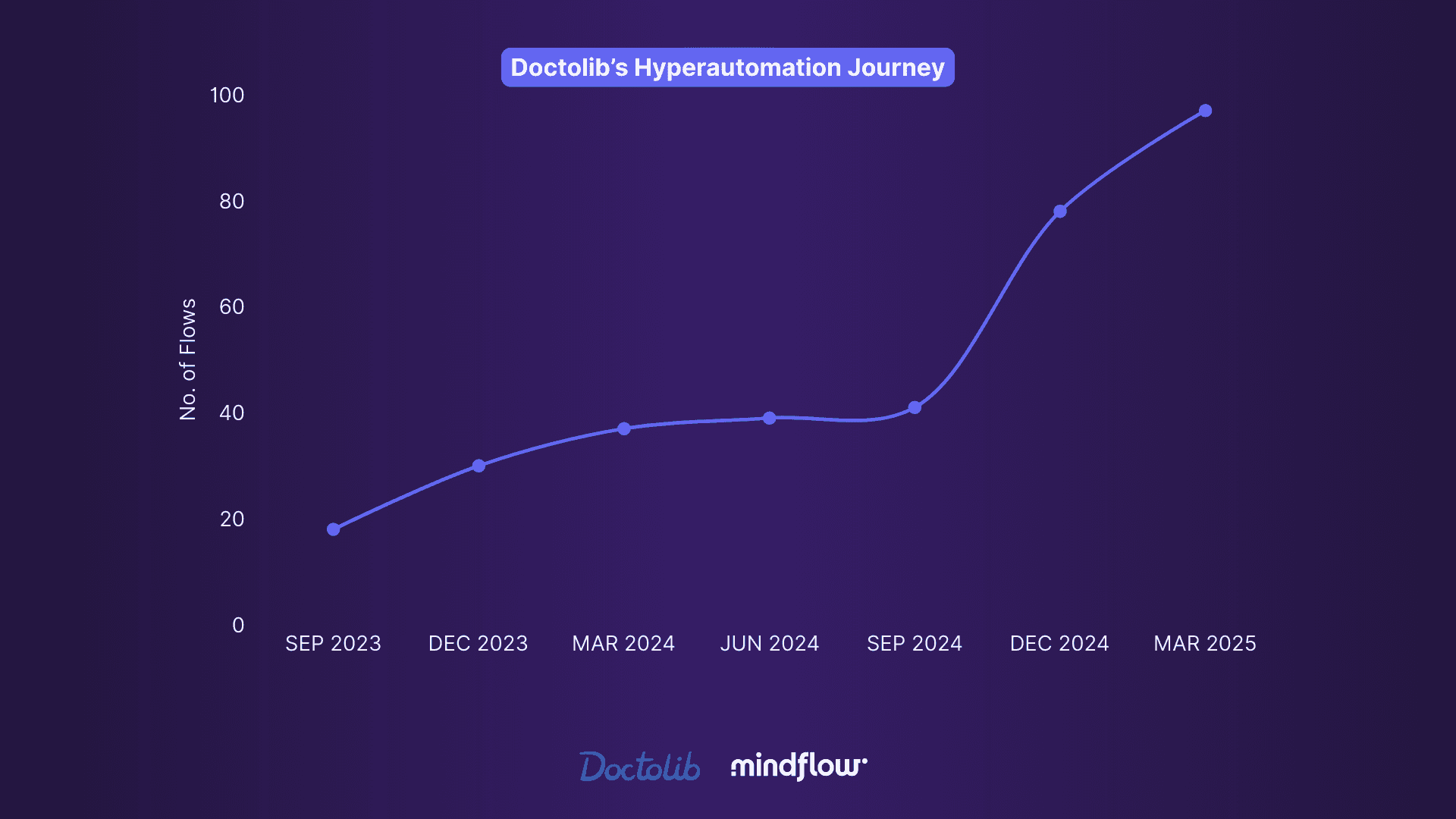
Mindflow Customer Storie: Doctolib
Doctolib is Europe’s foremost health-tech platform, trusted by medical professionals and millions of patients. Within it, a dedicated Customer Care Performance Team governs the processes and tools behind support operations. Despite its mandate, the team was hampered by manual, fragmented workflows. Every incident required hand-offs across IT, Product Support, and Incident Management, turning simple updates into multi-step relays. Internal clarity lagged; external notifications arrived late. Bottlenecks multiplied, eroding response times and customer confidence. Eliminating these friction points became an operational imperative.
How Mindflow transformed Doctolib 's operations:
90% in average communication delays: The team reduced average communication delays from 30 minutes to just 3 minutes, streamlining the entire incident resolution process and ensuring faster, more efficient responses.
Enhanced Stakeholder Involvement: Both internal and external stakeholders benefit from more transparent, more timely updates, leading to greater overall satisfaction.
Increased Employee Satisfaction & Cross-Team Collaboration: Team members can focus on strategic communication rather than manual updates. Real-time notifications and seamless integration with Slack ensure a smooth flow of information.
Read the complete Customer Storie
Implementing Automation Culture with No-Code, Scaling Automation with Mindflow
Building a culture of automation is about more than just implementing technology; it’s about changing the way teams think and work. At its core, a culture of automation enables teams to focus on more strategic, high-value tasks while automating repetitive processes. However, the most prominent challenge organizations face in fostering such a culture is getting started. In most cases, teams are hindered by the complexity of automation tools and the long timelines required to deploy them.
This is where Mindflow comes in. Automation isn’t just a feature within the platform; it’s the very foundation. From day one, Mindflow’s mission has been to eliminate every barrier between idea and execution, ensuring that automation can be embraced by everyone, regardless of their technical expertise.
Unlike traditional SOAR tools that only the largest SOCs can fully utilize, Mindflow brings automation to every analyst and engineer with an intuitive platform, accelerating the adoption of an automation-first culture.
The Time-to-Value Problem: Breaking the Barrier Between Idea and Execution
In many organizations, the most significant limitation is time. Teams recognize the need to automate processes to reduce manual tasks and focus on more important challenges. However, they often find themselves stuck: stuck deciding which tasks to automate, stuck figuring out how to implement automation, and stuck waiting for engineering resources to build and deploy the solutions.
Mindflow solves this problem by removing the most challenging part of automation: the build. By eliminating technical roadblocks, Mindflow empowers teams to take ownership of automation without waiting on development teams.
With features like AI··Ideation, Mindflow helps users identify what to automate. Users can describe the tools they’re using and the KPIs they want to improve, and Mindflow will suggest tailored automation opportunities. This feature enables teams to quickly pinpoint where automation can have the most significant impact without the guesswork of deciding on their own.
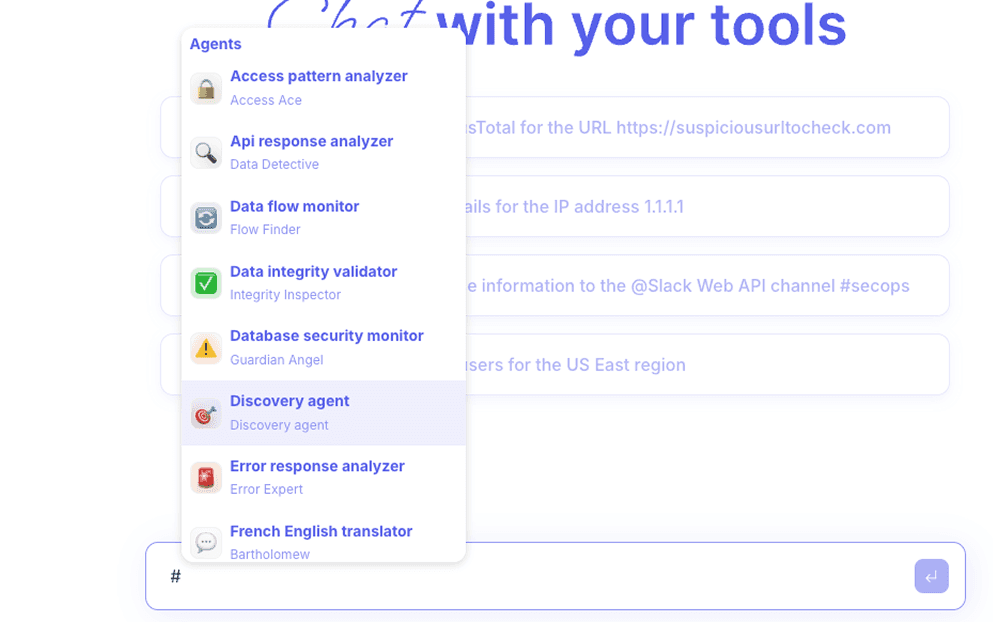
Once the opportunities are identified, AI··Build takes over, allowing teams to write a single prompt describing what they want to automate and turning that prompt into a fully functional workflow. Mindflow handles all integration and configuration, leaving no room for error or confusion. There are no APIs to learn, no complex manual setups, and no need for engineering tickets. This isn’t just about speeding up development; it’s about removing the need for development entirely.
The result? Time-to-value isn’t just a metric; it’s the difference between having automation that exists and automation that’s actually used. By empowering teams to act on their automation ideas instantly, Mindflow ensures that automation becomes a part of the workflow rather than a distant goal.

Native Integrations and Full API Coverage: Automate Across 4,000+ Tools
When it comes to automation, the ability to connect with existing tools is critical. Many automation platforms have limited connectors that provide only partial access to third-party tool features, leaving processes incomplete or inefficient.
Mindflow changes this with native integrations that provide 100% API coverage across more than 4,000 tools. Whether it’s automating security workflows with CrowdStrike, managing identity and access in AWS, or orchestrating complex IT processes across the enterprise, Mindflow offers complete integration across a wide range of platforms. This eliminates the need for middleware or managing multiple integrations, which can lead to errors and delays.
With complete API coverage, Mindflow ensures that automation is both comprehensive and seamless. Every endpoint, operation, and integration can be automated with confidence, ensuring nothing is left behind.
AI··Agents: Intelligent Automation That Scales
As organizations scale, they often need more than just automated workflows; they need intelligent automation that can make decisions, adapt to real-time data, and coordinate tasks across multiple systems. This is where AI··Agents come in.
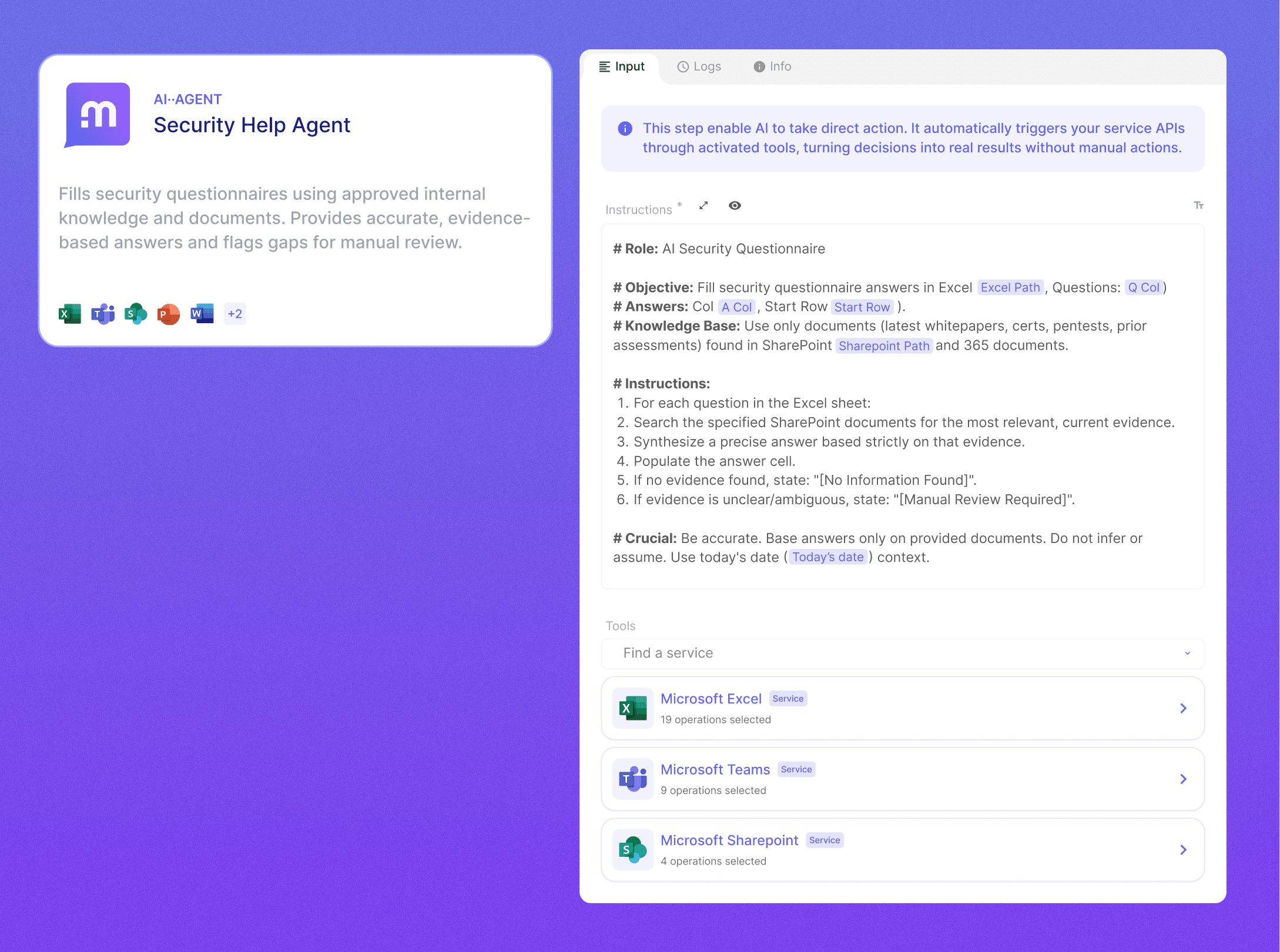
Mindflow’s AI··Agents act as digital coworkers with domain-specific expertise. They can reason and act autonomously across the 4,000+ integrations, combining context-aware intelligence with deterministic execution. Each agent can make decisions based on data and coordinate with other agents to optimize workflows in real time. This means that automation isn’t just about automating tasks; it’s about creating an intelligent system that learns and adapts as it scales.
AI··Agents operate securely under Role-Based Access Control (RBAC) and come with full audit logs, providing complete transparency. Whether triggered manually, by a schedule, or through webhooks, these agents are designed to scale without code. This level of intelligence enables Mindflow to handle complex, real-world scenarios that would otherwise require constant human intervention.
No-Code; Designed for Everyone:
Mindflow’s approach to automation is built on the no-code philosophy. While many automation platforms claim to be "low-code," Mindflow takes this a step further. No-code isn’t a compromise for Mindflow; it’s the core of the platform.
With Mindflow, anyone can create workflows visually, without needing technical expertise. However, unlike other no-code platforms that simplify everything to the point of limiting flexibility, Mindflow allows developers to retain control over complex logic, data mapping, and error handling. This combination of simplicity for non-technical users and powerful features for engineers makes Mindflow the perfect platform to unite business teams and IT under a single automation layer.
By removing the technical barrier to automation, Mindflow encourages cross-functional collaboration. Business teams can automate their workflows without waiting for the IT department, while engineers can continue to focus on more complex tasks, all within a single unified system.
Enterprise-Grade Scalability and Security:
As organizations grow, their automation needs become more complex. Mindflow is built to scale with enterprise-grade performance, security, and compliance in mind.
With SOC 2 Type II compliance, encryption, and isolation of sensitive data, Mindflow ensures that automation meets the rigorous standards required by enterprise organizations. It supports massively parallel workflows, enabling teams to run thousands of automation tasks concurrently without performance degradation.
Additionally, Mindflow’s Vault-based credential management ensures that sensitive API keys and credentials are handled securely, while high availability guarantees that workflows run smoothly, even at scale. Mindflow is designed to scale without sacrificing security or performance, making it a trusted platform for enterprises looking to integrate automation across their operations.
Building an Automation Culture with Mindflow
By removing the barriers to automation and making it accessible to everyone, from business teams to engineers, Mindflow helps organizations cultivate a true automation culture. The platform’s no-code design, intelligent automation, and native integrations enable teams to automate workflows quickly and efficiently, ensuring automation becomes an integral part of daily operations rather than a one-time project.
Mindflow’s approach to automation is people-centric, focusing on empowering teams to take ownership of their processes and freeing them from technical dependencies. With AI-driven ideation, no-code workflows, and full API coverage, Mindflow turns intent into action fast, transforming automation from an abstract goal into a daily reality.
This is how automation culture scales. Mindflow enables teams to automate without friction, making automation not just possible, but sustainable, creating lasting change and real impact across the organization.
From Automation Projects to Automation Culture
Building a culture of automation is no longer optional; it's a strategic imperative. In a world where agility, efficiency, and resilience define success, organizations must go beyond isolated automation initiatives and embed automation into the way teams think, collaborate, and operate. That shift doesn’t happen through tools alone; it takes platforms that remove friction, empower every team member, and scale with intelligence.
No-code, agentic platforms like Mindflow make that transition possible. By turning intent into action instantly, without the delays of traditional development cycles, Mindflow enables teams to participate in and contribute to an authentic culture of automation. The result: faster outcomes, more empowered employees, and an enterprise that learns and evolves continuously.
Automation isn’t just something your teams use. It’s something they live with. And with the proper foundation, it becomes a culture that scales.